


RideRTC
3.7637.00 Reviews
App Specs
- Version
- 7.9.6
- Updated On
- License
- Free
- Downloads
- 1,000,000+
- Developer
- RTC of Southern Nevada
- Categories
- Travel & Local
- Platform
- Android, iOS
Screenshots
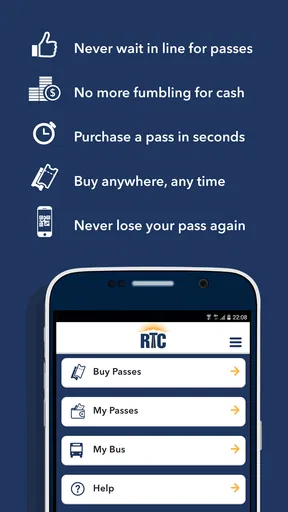
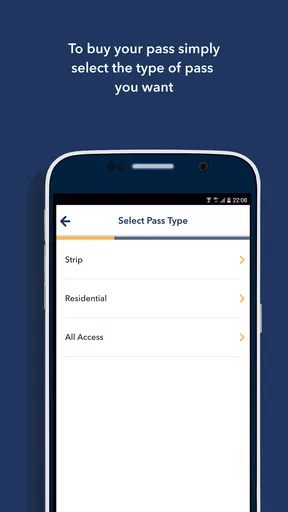
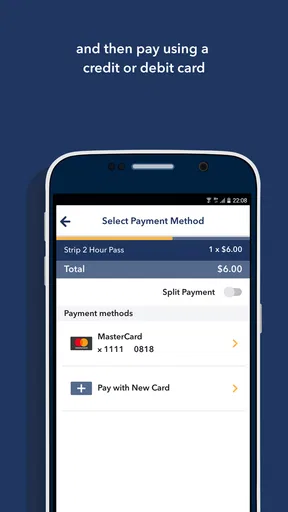
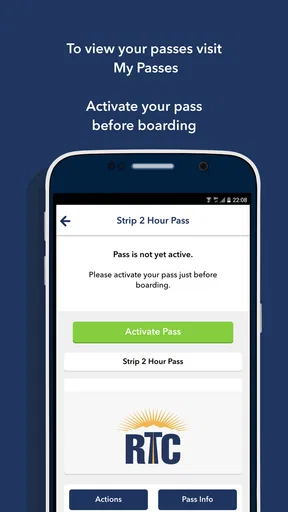
 Analysis by AppCompare
When I am moving around Southern Nevada, the hardest part is often not finding a bus stop; it is making a decision while I am already outside, carrying luggage, watching the time, and dealing with a phone that may not have a perfect connection. That is where RideRTC makes sense. This free travel and local app from RTC of Southern Nevada is designed for residents and visitors who need transit information in one place, rather than jumping between a general map app, a browser, and separate ticket or route pages.
I tested it with a practical mindset: not as a novelty, but as something I might open before leaving a hotel, while changing buses, or when plans suddenly shifted. My overall impression is positive, although it is not the kind of app I would trust blindly without preparing a little. Its value depends heavily on having a working connection at the moment I need current information. When that connection is available, it can reduce the mental work of navigating public transportation. When it is weak, the experience becomes much less comfortable.
How RideRTC fits into a real Southern Nevada trip
The app belongs to the Travel & Local category, and that description is a good match for its audience. It is not aimed only at daily commuters or only at tourists. A local rider can use it as a regular transit companion, while a visitor can use it to understand the network without already knowing the area. That combination is important in Southern Nevada, where a short-looking trip can involve unfamiliar roads, busy visitor areas, and a choice between walking, riding, or combining both.
What I like most about an all-in-one transit app is the reduction in searching. Instead of beginning with a broad web search and trying to decide which result is current, I can start with the transit service itself. That makes the app more useful when I already know I want public transportation and need to work out the details. It is a more focused experience than a general navigation tool, especially when the question is not simply “how do I get there?” but “which transit option should I take, and what should I do next?”
For a visitor, the first useful habit is to check the journey before walking out of a hotel or attraction. I would look at the route, note where I need to board and leave, and pay attention to any transfer. That small preparation matters because a phone signal can become unreliable exactly when I am standing near a busy road, inside a large building, or surrounded by other people using the same network. RideRTC is best when it supports a plan, not when it is expected to rescue every decision at the last second.
Connectivity changes the experience more than the interface does
Transit information is time-sensitive by nature. A route plan that was useful earlier can become less useful after a missed connection, a change in traffic, or a service disruption. RideRTC therefore feels strongly tied to connectivity. I would not describe that as a flaw unique to this app; it is a basic trade-off of relying on current transit information. Still, it affects how confidently I use it.
With a stable connection, the app is convenient because I can request information when my plans change. I might decide to leave a stop later, alter my destination, or compare a direct ride with a transfer. The app becomes a decision-making tool rather than a static timetable. The important point is that I need to allow time for information to load before I start walking. Opening it only after I am already lost is a poor workflow, particularly in an unfamiliar part of the city.
Worth Reading Before You Choose

EA SPORTS FC Mobile 26 Is a Bigger Football Game, but It Takes Time

Flipboard Shows What News Apps Must Do Beyond the Feed

Switching to Android Auto Means Rethinking Your Driving Routine

Google Calendar Makes a Crowded Week Easier to Manage

Ludo King Makes the Most of the Minutes Between Plans

Baby Panda World Brings Quick Play to Modern Phones, but Its Game Library Feels Busy
Weak connectivity creates a different kind of friction. The problem is not merely waiting for a screen; it is uncertainty. I may not know whether the information is still loading, whether my request needs to be tried again, or whether I should stop relying on the phone and use the information I already saw. For that reason, I recommend checking the next part of a journey while the connection is strong and mentally noting the essential steps. I would treat that as sensible travel preparation rather than assuming the app can replace it.
A realistic day with the app
Imagine I am staying in Southern Nevada and have an appointment across town. I open RideRTC before leaving, select the destination, and review the suggested transit journey. I pay special attention to the first boarding point because that is where visitors are most likely to make a mistake: the nearest-looking stop is not always the correct one for the direction of travel. I also check whether the journey requires changing vehicles, since a transfer changes how much walking and waiting I should expect.
Once I have started walking, I keep the phone available but do not repeatedly refresh it without a reason. That saves battery and reduces dependence on a connection that may fluctuate. At the stop, I use the app to confirm the next step if the signal is reliable. If it is not, I rely on the route details I already reviewed and avoid making a new complicated search while standing in a hurry.
On the return trip, the situation is different. I may be tired, carrying shopping, or leaving later than planned. This is when the app’s all-in-one approach becomes particularly useful, because I can reassess rather than repeat the morning journey from memory. The practical strength is not that it makes public transportation effortless; it gives me a single place to rebuild the plan when the day stops following the original schedule.
Using it while walking, waiting, and transferring
Mobile context matters. A transit app is often used one-handed, outdoors, and under time pressure. I prefer to do the detailed planning before I reach the stop, then use the phone for short checks. That approach makes RideRTC feel less demanding. If I try to perform every step while crossing a large area or searching for the correct boarding point, the small screen and surrounding distractions become part of the problem.
Transfers deserve extra attention. A direct trip is usually easier to understand, but a transfer can be the more practical option when it avoids a long walk or gets me closer to the final destination. I would not judge a suggested journey only by its total travel time. I also consider how easy the change is to recognize, whether I will have to cross a busy area, and whether I am comfortable making the connection if the first vehicle is delayed.
One useful technique is to capture the sequence mentally in three parts: where I board, where I change if necessary, and where I leave the service. I do not need to stare at the app continuously. This reduces screen dependence and gives me a fallback if the connection drops. It also helps when I am traveling with someone else, because I can explain the plan instead of handing over a phone and expecting them to follow every prompt.
The best way to use RideRTC is as a live planning aid with a simple backup plan, not as the only thing keeping the journey together. That distinction is especially important for visitors who may not recognize local streets or know how to recover from a missed stop.
What happens when something goes wrong
Every transit app is tested most seriously when the original plan fails. I find RideRTC useful for recovery when I still have enough connectivity to request another route. If I miss a vehicle, change my destination, or discover that a walking approach is inconvenient, I can return to the app and rethink the trip instead of starting from scratch in a browser.
However, recovery is not always immediate. A poor connection can turn a simple reroute into a frustrating pause. I would avoid closing the app in a panic and reopening it repeatedly, because that does not solve the underlying network problem. A better response is to wait briefly in a safe place, try the request again when the connection improves, and use the last route details I reviewed as a temporary guide.
Battery is another practical concern, even though it is easy to overlook. Constantly checking maps, refreshing transit information, and keeping the screen bright can drain a phone during a long day. I use the app in bursts: plan, confirm, put the phone away, then check again near the next decision point. That workflow is more comfortable and leaves me with more battery for calls, identification, or other travel needs.
If I were traveling to an appointment where being late would have serious consequences, I would not rely on a single suggested journey. I would review the route ahead of time and leave room for an unexpected delay. RideRTC can help me make a better plan, but it cannot remove the uncertainty built into public transportation or guarantee that my phone will remain connected.
Data-conscious habits for everyday use
Using a transit app does not have to mean leaving it open for the entire journey. The most data-conscious approach is also the one I find least stressful: perform the main search on a reliable connection, read the result carefully, and reopen the app only when a new decision is needed. This is practical for anyone with limited mobile data, but it also helps people whose connection is simply inconsistent.
I would avoid repeatedly requesting the same journey while standing still unless something has genuinely changed. If I already know the boarding point and transfer, refreshing every few seconds adds little value. Instead, I check again when the departure window is approaching or when I have new information that changes the plan. This makes the app feel more like a tool I control rather than a feed I have to watch continuously.
For visitors, another smart habit is to prepare important journeys before leaving a strong Wi-Fi connection. That does not mean assuming the app works without a network; it means reducing the number of decisions that must be made in a weak-signal environment. I would also keep the destination written down or remembered in a simple form, especially for a late return trip. The app remains useful, but I am not making myself dependent on one perfect loading moment.
Who will appreciate it, and who may prefer another option?
RideRTC is a strong fit for Southern Nevada residents who regularly use the local transit network and want a dedicated source for planning. It is also worthwhile for visitors who prefer public transportation and do not want to piece together information from unrelated services. The app’s focus is an advantage when the trip is specifically about RTC transit rather than driving, ridesharing, or walking alone.
I would be more cautious recommending it to someone who almost never uses public transportation and expects a general-purpose navigation app to explain every surrounding detail. A broad map service may feel more familiar for comparing driving, walking, cycling, and ridesharing in one view. Likewise, a traveler whose plans change constantly between different transportation types may prefer that broader comparison. RideRTC makes more sense when transit is central to the journey.
It is also not my first choice for a person who refuses to plan ahead and expects perfect guidance in a dead zone. The app’s usefulness is closely connected to access to current information. Someone who needs a fully self-contained reference should build a stronger offline travel routine and not assume that a live transit tool will behave like a downloaded guide.
The audience size suggests that the app is not a niche experiment. RideRTC has passed one million installs, carries an average rating of 3.7 from around 1,800 ratings, and has about 637 written reviews. Those figures indicate meaningful use while also showing that the experience is not universally smooth. I read that combination as a reason to approach it realistically: popular enough to be worth trying, but not so highly rated that I would ignore the need for personal backup habits.
Version, access, and everyday practicality
The app is free, which removes the biggest barrier to trying it before a trip. It is rated for Everyone, making it suitable for a broad audience, and the current version is 7.9.6. RideRTC was released on September 5, 2016, so it has had time to develop beyond the idea of a simple route lookup. It is maintained by RTC of Southern Nevada, the developer associated with the local transit service.
Device compatibility is also reasonably broad: the minimum operating system is Android 8.0. That matters for people using an older phone as a travel device, although I would still install and open the app before departure rather than waiting until I am standing at the stop. A first launch, update, or account-related step is the wrong thing to discover during a rushed transfer.
One practical question many users have is whether the app is worth keeping installed if they only visit occasionally. In my view, yes, if public transportation is part of the itinerary. Since it is free, I can install it before the trip, test the basic planning flow, and remove it later if I do not need it. For a local rider, the case is stronger because repeated use makes the planning habits and route structure easier to understand.
My connectivity verdict
RideRTC works best when I treat connectivity as part of the travel plan. With a stable signal, it gives Southern Nevada residents and visitors a focused way to organize transit journeys, reconsider routes, and recover from ordinary changes during the day. Its dedicated local purpose is more useful than a generic map when I already know that public transportation is the option I want.
The limitations are just as clear. I would not depend on it as my sole source of orientation in a weak-signal area, and I would not keep refreshing it throughout a long trip. Planning ahead, remembering the key boarding and transfer steps, and conserving battery make a noticeable difference. Those habits are not workarounds that defeat the app; they are the sensible way to use a connected transit service.
My recommendation is straightforward: install RideRTC if you live in Southern Nevada or are visiting and expect to use local transit. Give yourself a few minutes to plan the first journey while connected, and use the app in short, deliberate checks afterward. If you want one focused transit companion and are comfortable with a network-dependent experience, it is a useful free choice. If you need a broad all-transportation planner or a guaranteed offline reference, another tool may suit you better.
After using it in that way, I see RideRTC as a practical companion rather than a magic travel solution. It earns its place on my phone because it simplifies local transit decisions, especially when plans change. I just make sure the app is supporting my preparation instead of becoming the only preparation I have.
Pros
- Real-time bus and paratransit arrival information helps reduce waiting uncertainty.
- Trip planning combines RTC routes
- schedules
- and nearby stops in one place.
- Service alerts can help riders spot delays
- detours
- and route changes.
- Stop locations and route details are useful when navigating unfamiliar areas.
- Free to download
- with practical tools for regular public transit users.
Cons
- Coverage is limited to the RTC service area and may not help outside Las Vegas.
- Arrival predictions can be inaccurate when traffic or vehicle data changes suddenly.
- Some features depend on an active internet connection and location access.
- The interface may feel less intuitive for first-time public transit users.
- Limited transportation options compared with broader multi-city transit apps.
FAQs for RideRTC
What is RideRTC and what can I use it for?
RideRTC is the official mobile app for Regional Transportation Commission public transit services in the Las Vegas Valley. It is designed to help riders plan trips, check routes and schedules, view nearby stops, and access real-time transit information where available. Depending on your location and service, the app may also support mobile ticket purchases, making it useful for both everyday commuters and visitors.
Can I buy and use bus tickets through RideRTC?
RideRTC may allow users to purchase selected transit passes and fares directly from the app, depending on the route, ticket type, and current service availability. After buying a pass, you generally need to activate or display it according to the instructions shown in the application. Before relying on a mobile ticket, check that your phone is charged, your payment method works, and the pass is valid for your intended service.
Does RideRTC provide real-time bus locations and arrival information?
The app can provide route schedules and, on supported services, estimated arrival times or vehicle locations. Real-time information depends on data received from the transit system, so it may occasionally be delayed, incomplete, or unavailable because of technical problems, traffic, detours, or poor connectivity. For important journeys, it is best to compare live updates with the published schedule and allow extra travel time.
Do I need an internet connection or location access to use RideRTC?
An internet connection is normally needed for current schedules, trip planning, ticket purchases, account functions, and real-time updates. Location access can make it easier to find nearby stops and plan from your present position, although you may be able to search for routes manually without enabling it. Because coverage can be inconsistent, review your trip details before leaving and keep any purchased ticket accessible.
Is RideRTC suitable for visitors who are unfamiliar with Las Vegas transit?
RideRTC can be helpful for visitors because it brings route information, stop searches, schedules, and fare options together in one place. However, first-time riders should still check the exact stop, direction, transfer details, and service alerts before boarding. Transit conditions can change during events, construction, or unusual traffic, so the app should be treated as a planning tool rather than a guarantee of arrival times.


